Clients & registration
Confidential and public clients, RFC 7591 Dynamic Client Registration, and scope management.
OAuth clients
- Multi-tenant: each client belongs to an environment.
- Per-client scope grants and multiple redirect URIs per client.
- Configurable client ID prefix (
CLIENT_KEY_PREFIX).
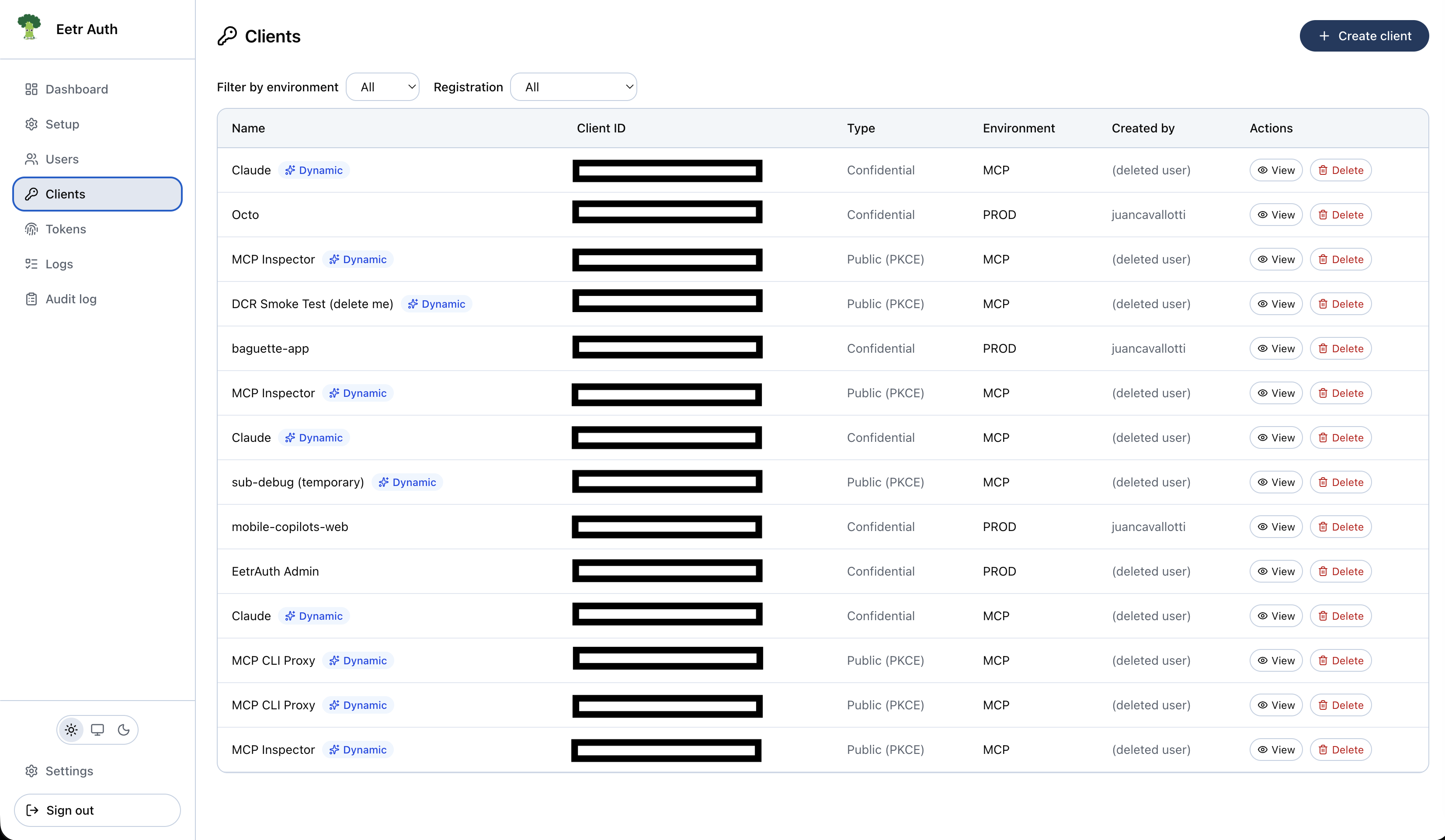
Confidential and public clients
token_endpoint_auth_method determines how a client authenticates at /token:
| Method | Secret? | Proof at /token |
|---|---|---|
client_secret_basic (default) | Yes (hashed secret generated) | Client secret |
client_secret_post | Yes | Client secret in the body |
none (public / PKCE-only) | No | PKCE code_verifier |
Public clients
Public clients have no secret — PKCE is the proof of possession at /token. This is the right
choice for SPAs, mobile apps, and MCP clients. client_credentials is rejected for public
clients. See the SPA / public client guide.
Test clients
A test client is a normal OAuth client in every protocol respect — same grants, scopes, custom claims, redirect URIs, and tokens. Two things differ:
- Its sign-in page lists the test users granted its environment instead of the password form. Picking one signs in immediately, with no password and no passkey.
- It skips the consent screen for a test user. Synthetic users have nobody meaningful to ask; the
user_consentsrow is still recorded, so admin consent listing and revocation are unaffected. A normal user reaching a test client still sees the screen, which is where they can switch accounts.
Create one from Clients → New client by ticking Test client. The list shows a Test badge and the Registration filter gains a Test entry.
For the end-to-end setup — creating the pair and driving the flow from a script — see Local development with agents.
The pairing rule is asymmetric, and worth stating plainly:
| test client | normal client | |
|---|---|---|
| test user | allowed | refused (access_denied) |
| normal user | allowed | allowed |
A test user is refused by every non-test client, enforced at /authorize and re-checked on every
token refresh (which revokes the presented refresh token). A normal user is not refused by a test
client — a test client is just a client — but the picker offers no way in, so this only happens with
a session they already hold, and that case goes through the consent screen.
Anyone who can reach the page can be any test user on it
There is no secret in this flow; that is the point of it. Never grant a test user an environment that also contains production clients, and treat a test client's URL as public.
Set at creation, and never on a DCR client
is_test is fixed when the client is created and shown read-only afterwards, like the
environment — flipping it would change who can authenticate against a client that already has live
tokens. A dynamically registered client can never be a test client: it is registered by an
unauthenticated caller, so allowing it would let anyone mint a client whose sign-in page hands out
sessions with one click. Refused by the service and by a DB CHECK.
Dynamic Client Registration (RFC 7591)
POST /api/register lets clients self-register without an admin. It is a public endpoint,
CORS-enabled for browser-based MCP clients, and is how MCP clients (Claude, ChatGPT) connect.
It accepts:
redirect_uris(required, exact-matchhttps—httpallowed for loopback clients, capped in count)token_endpoint_auth_method(defaultnone)grant_types(authorization_code/refresh_token)response_types(code)client_namescope(must be known scopes)
It returns client_id (plus client_secret only for confidential clients). Registered clients land
in the DCR_ENVIRONMENT_ID environment and are flagged is_dynamic; the admin Clients list
shows a Dynamic badge and a registration-type filter.
Abuse controls
DCR is protected by a per-IP daily rate limit (DCR_RATE_LIMIT_PER_DAY, default 10, counting
every attempt), exact redirect-URI matching (no wildcards), and DB-backed counters pruned by the
daily cron. Disable it entirely by leaving DCR_ENVIRONMENT_ID unset or setting
DCR_ENABLED=false.
See the MCP server with DCR guide for an end-to-end walkthrough.
Loopback redirect URIs
Redirect URIs are matched exactly, with one deliberate exception: for loopback URIs the host
is treated as fungible. localhost, any 127.0.0.0/8 address, and [::1] all address the same
machine, and a client may register one spelling but request another. Scheme, port, path, and
query are still compared strictly — a client that binds a new ephemeral port must register that
port. Ports are compared after normalization, so an explicit default (:80 on http, :443 on
https) matches the same URI with the port omitted.
When a loopback request matches, the registered spelling is what gets bound to the
authorization code and used for the redirect. That matters because the token exchange sends
redirect_uri in a request body and must match the code.
Why the host has to be fungible
Beyond RFC 8252 §7.3, Next.js forces this: it rewrites loopback hosts to localhost across the
entire request URL string rather than just its hostname (REGEX_LOCALHOST_HOSTNAME in
next/dist/server/web/next-url.js). A redirect_uri=http://127.0.0.1:5173/cb query parameter
therefore reaches a route handler already rewritten, while the same URI in a JSON or form body —
registration, token exchange — arrives untouched. The rewrite is not global, so it hits only the
first loopback address in the URL, which makes the effect depend on query-parameter order.
The same reasoning applies to the resource indicator, whose loopback host is canonicalized to
localhost so /authorize and /token agree; that canonical form is what lands in the token's
aud. Canonicalizing re-serializes the URL, so a pathless loopback resource picks up a trailing
slash (http://localhost:3000 → http://localhost:3000/). An https resource is never
rewritten.
Scopes
Default OIDC scopes are seeded on install: openid, profile, and email are created by the
schema/seed so OpenID Connect works out of the box.
openidis required to mint anid_tokenand to call/userinfo.profileandemailgate their respective claims.- Seeding only defines the scopes — an admin still grants them to each client, and the
client must request them at
/authorize(or request noscope, which defaults to all of that client's grants).
Additional capabilities:
- Custom scope definitions (admin dashboard → Scopes).
- Per-client scope allowlist.
- Scope propagation through token rotation.
Custom JWT claims
A client can define static custom claims that are injected into every access token it is
issued. Configure them in the client side panel (Dashboard → Clients).
Each claim has a name, a value, and a type — string, number, boolean, or json — so the claim
lands in the JWT with its real JSON type rather than as a quoted string:
| Name | Value | Type | In the token |
|---|---|---|---|
tenant | acme | string | "tenant": "acme" |
tier | 3 | number | "tier": 3 |
beta | true | boolean | "beta": true |
roles | ["admin","ops"] | json | "roles": ["admin","ops"] |
Values are static: the same claim set goes into every access token for that client, regardless of which user authorized it.
Reserved claims
iss, sub, aud, exp, nbf, iat, jti, scope, client_id, and environment are owned
by the issuer and cannot be overridden — a client could otherwise forge its own identity, audience,
lifetime, or scope. They are rejected when saving, and filtered again at token-mint time, so a row
written directly to the database still cannot override them.
Custom claims apply to the access token only. The id_token remains a standard OIDC identity
assertion, and a claim whose stored value no longer decodes to its declared type is dropped from the
token rather than failing issuance.
Consent copy
A scope can carry two optional fields of human-readable copy, edited in the admin dashboard under Setup → Basic → Scopes:
| Field | Shown as | Example |
|---|---|---|
display_name | The line title on the consent screen | Your email address |
description | The explanation beneath it | See your email address and whether it is verified. |
Both are optional. When neither is set the consent screen falls back to the raw protocol token
(read:users), which is the behaviour every scope had before this existed. The three seeded OIDC
scopes ship with copy already written.
Copy is presentation only — it never appears in scopes_supported, in a token, or anywhere else in
the protocol.
`scope_name` is not editable
Only the copy can be changed after creation. scope_name is the token clients send in scope, so
renaming it would break every client already requesting it and every grant referencing it.
Scope resolution
Requesting a scope a client wasn't granted fails with invalid_scope. In the
client library, prefer the OIDCScope constants and the scopes[] array
so a typo can't silently drop openid.