Administration
The admin dashboard, user and environment management, and the bearer-protected admin API.
Admin dashboard
The dashboard (/dashboard) is the operator surface. Its home view surfaces request latency
metrics (authorize / token / validate) broken down by environment and by day:
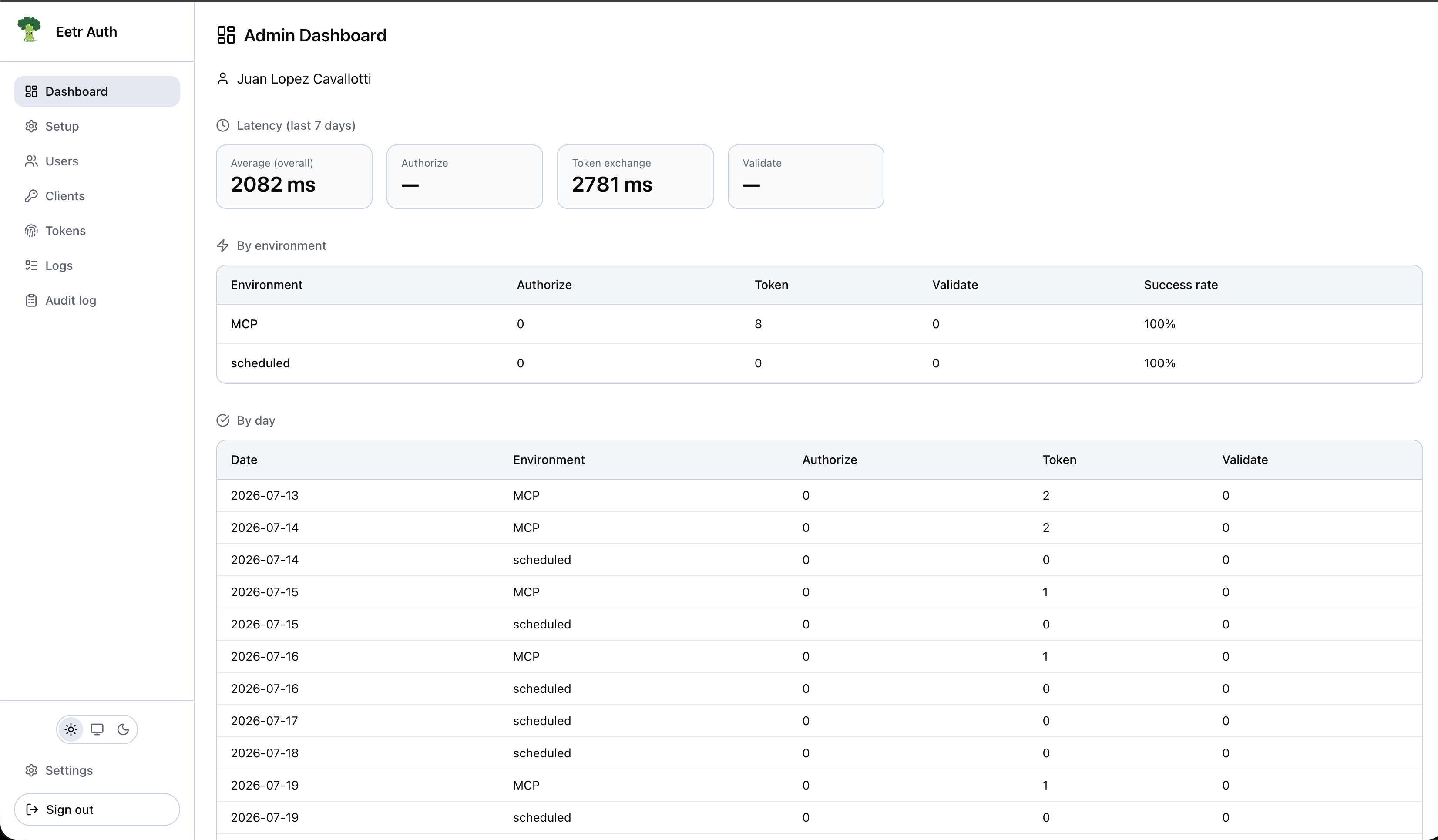
It provides:
- Full CRUD for users, including per-user environment grants.
- View and manage OAuth clients (with a Dynamic badge + registration-type filter for DCR-registered clients).
- Token activity log viewer.
- Users area (
Dashboard → Users) — the user side panel includes Connected applications: the clients that user has authorized, the scopes consented to for each, and a revoke action that also revokes the user's tokens for that client. - Environments carry an optional display name alongside their name. The name is the stable
identifier — it is the
environmentJWT claim, theenvironmentNamefield onPOST /api/token/validate, and the value stored in the activity log — so it cannot be changed freely. The display name is what the dashboard shows; when it is unset, surfaces fall back to the name. - Setup area (
Dashboard → Setup) — a tabbed page covering Basic (environments and scopes, side by side), Site identity (title, logo, URL, CDN URL), Admin API, and Password policies (per-environment complexity rules + max password age).
User management
Profiles
- Username, email, avatar.
- Avatar upload to R2 (via the Cloudflare Images API).
- Self-service profile update.
- Gravatar-compatible avatar fallback (MD5-based).
Environment access
Users are granted access to specific environments via a users_environments mapping:
- Grants are edited inline in the admin Users list (and shown as badges per user).
- Grants drive per-user password-policy resolution (the login max-age gate) and are re-checked on every token refresh.
- On upgrade, every existing user is granted every environment for backwards compatibility.
Environments and clients
A regular user's environment is derived from the client id used at sign-in. Admins do not belong to
an environment. DCR-registered clients land in DCR_ENVIRONMENT_ID, so grant the intended users
access to that environment or /authorize will reject them.
Test users
A test user is a passwordless account that signs in with one click from a test client's sign-in page. They exist so that exercising an integration does not mean creating a real account with a real password and typing it on every run.
- Create one from Users → New user by ticking Test user (passwordless). Ticking it clears Is admin and disables the password field.
- Grant at least one environment. That grant is the only thing that puts the user on a sign-in page — a test user with no environment appears nowhere.
- They store the empty sentinel
''inpassword_hash, so no password can ever authenticate them. They also cannot register a passkey, and a password-reset request for one is silently ignored. - They can never be admins. This is enforced in the service, in the session (the provider hardcodes
isAdmin: false), and by a DBCHECK, so no path — dashboard, admin API, or hand-written SQL — can produce a passwordless dashboard admin. - Usernames are globally unique, so prefix them per environment (
test_staging_alice) if two teams share a deployment.
The flag is set at creation and cannot be changed
There is no toggle on an existing user, and both admin API endpoints reject isTestUser. Promoting
a real user would leave a real password hash on an account signable with one click; demoting a test
user would leave an account nobody can sign into. Delete and recreate instead.
Admin API
- Bearer-token protected (a client-credential JWT from a client configured as an admin API client).
- Admin operations: create / update / delete users, manage tokens.
- Drive it programmatically with the client library.
Lock down the admin surface
The admin dashboard (/dashboard*) and admin API (/api/admin/*) should not be reachable by the
general public. Put them behind an IP allowlist or Cloudflare Access in addition to the in-app
bearer protection — see the WAF guide.